Working with your AWS account and DevPanel
Managing your AWS Account
DevPanel manages your AWS account for you.
That means that you'll always have full control over your own account. However, we recommend that you strictly limit access to your AWS account. Only grant access to experienced sys admins, and that's it. Do not let developers work directly in your AWS account as they may accidentally interfere with DevPanel's operations.
And although you'll have Admin access to your account, we recommend that you DO NOT run any other applications in that account and just let DevPanel manage that entire account.
Best Practices
Here are some good practices to follow when you're managing your own AWS account.
Use a Password Manager
Password manager are great at generating strong random passwords and keeping them secure. We recommend using BitWarden because it has a built-in MFA/2FA/TOTP manager. https://bitwarden.com/
Use Group Email Alias for root account
Even if you're the only one in that email group... this allows you to assign someone else to manage that account in the future. Also, when you're not available (think vacation), you can add other people to the group so they can recieve account notifications and act on them.
Secure your accounts with MFA
MFA, or Multi-Factor Authentication, also known at 2-Factor Authentication, is highly recommended for all your AWS accounts.
Use the following guide to enable MFA on your accounts: https://docs.aws.amazon.com/IAM/latest/UserGuide/id_credentials_mfa_enable_virtual.html
Create user accounts
Do not use your root account for everything. Create a user account even for yourself and use that.
Use the following guide to create user accounts using IAM: https://docs.aws.amazon.com/IAM/latest/UserGuide/id_users_create.html
Disable User Account Access Keys
Most regular users do not need programatic access to their accounts. Account access keys pose an unnecessary risk and should be disabled or deleted entirely.
Do not share accounts
This goes without saying but just in case -- DO NOT SHARE ACCOUNTS! Each user/admin should have their own account.
Review account access often
If you're giving out access to different people in your organization, make sure to review the IAM Users section of your account and disable/delete accounts regularly.
Enable CloudTrail
This will keep an audit trail of who did what in your account. Enable it in all regions. https://aws.amazon.com/cloudtrail/
DevPanel and your AWS Account
Here's how DevPanel works with your AWS Account...
Account Access
DevPanel uses AWS Best Practices to access and manage your account. We use Cross-Account IAM Role based access to connect our account with your account.
Role Based Access
Here's an article from AWS that explains this in more detail: https://aws.amazon.com/blogs/apn/securely-accessing-customer-aws-accounts-with-cross-account-iam-roles/
Exclusive Access
You should ensure that
- no other applications have programatic access to this account
- no other applications are manually configured to run in this account
- you are not manually (or programatically) adjusting or changing any settings in this account
Only DevPanel should be running in this account.
If you violate any of these rules, then you're putting your own account and applications at risk.
Infrastructure Setup
Once it has access to your account, DevPanel uses Hashicorp's TerraForm to create infrastructure in your AWS account.
To learn more about TerraForm, see: https://www.terraform.io/
Here's a simple diagram of the base infrastruture that DevPanel will create in your account.
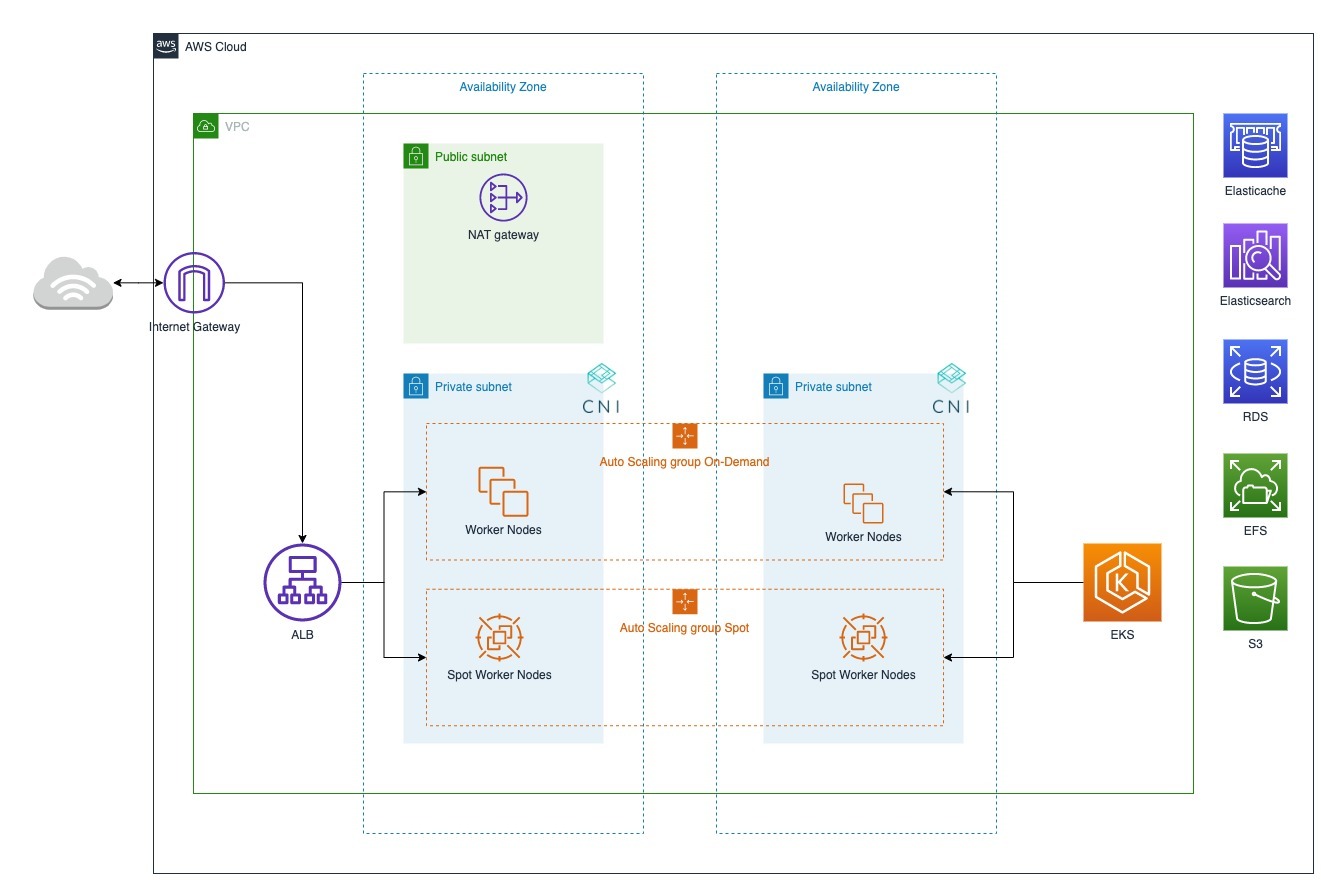
Depending on the client's needs, this infra can (and often is) customized.
All your sites and applications run on top of this infrastruture.